

What Is IPaaS? Essential Guide to Connecting Your Digital Product Ecosystem
Inside This Article

In today’s fast-paced, unpredictable manufacturing environment, success depends on how well enterprise systems and teams work together. Without a robust integration approach, even the best tools can create friction. iPaaS provides a centralized platform for connecting systems, automating processes, and managing data flows, helping organizations build a more efficient, agile, and scalable product development environment.
Here, we explain the fundamentals of iPaaS and examine common use cases. We also share practical strategies for successful adoption.
What Is iPaaS?
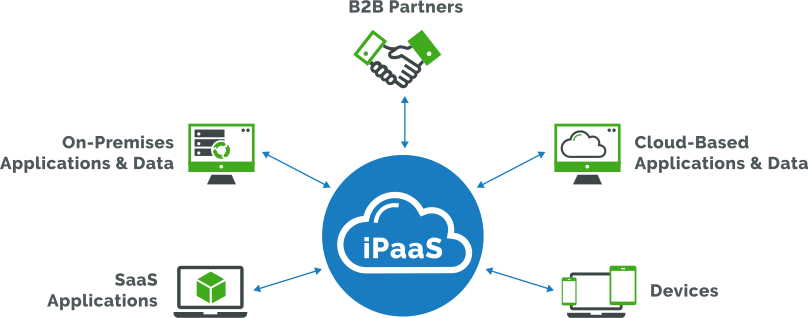
iPaaS, or integration platform as a service, is a set of cloud-based, self-service tools used to integrate systems, applications, and data across diverse environments and architectures, including cloud, on-premises, and hybrid setups. Instead of building one-off integrations between each system, iPaaS serves as a central integration layer. A simple way to think about it: If your systems are islands, iPaaS builds the bridges and manages the traffic between them.
Key Capabilities of IPaaS
- Pre-built connectors, application programming interfaces (APIs), and templates eliminate the need for custom coding, thereby simplifying the integration process.
- Low- or no-code development environments offer intuitive drag-and-drop interfaces, enabling non-technical users to create and manage their own system connections.
- Data transformation and mapping ensure that information flows seamlessly between systems and is translated into the right format.
- Process automations enable users to build workflows that trigger actions across different systems. For example, a product change in one system can automatically update downstream systems and notify the appropriate teams.
- Batch and real-time processing keep data consistent and up to date across systems. Batch processing is suitable for non-urgent and repetitive data transfers, whereas real-time processing is ideal for critical operations such as supply chain management.
- Data monitoring and analytics provide organizations with a centralized, real-time view of their integrations. Teams can monitor data flows, quickly identify performance issues, and maintain control over processes.
What Business Challenges Does iPaaS Solve?
Disconnected Systems in a Growing Tech Stack
Modern manufacturers rely on a growing ecosystem of enterprise solutions and tools to support product development, assembly, and maintenance. From collaboration apps like Microsoft Teams and Slack to business solutions like Jira, PLM, QMS, ERP, and MES—each plays a critical role in the product lifecycle.
Typical scenarios:
- Communication happens in Teams or Slack
- Product and quality information is managed in PLM and QMS
- Cost optimization and production details reside in ERP and MES
- Product development milestones and issues are tracked in Jira
What Happens When Enterprise Applications Are Not Connected
While these systems are powerful on their own, they were not designed to work seamlessly together because of their differing architectures. As organizations continue to adopt more applications, teams end up with fragmented data, manual handoffs, inefficient processes, and an inability to stay in sync.
The Cost of Connecting Systems the Hard Way
Many companies turn to custom coding or middleware to connect business systems. However, these approaches introduce their own set of challenges.
- Implementations take considerable time
- One-off connections serve only specific use cases
- Tightly coupled systems are difficult to change
- Every change requires additional programming effort
- Maintenance drives up costs
Hidden costs include:
- Greater reliance on IT
- Slower response to business changes
- More time spent maintaining integrations than on improving processes
- Inability to readily scale
In essence, integration becomes a bottleneck instead of an enabler.
This is where iPaaS delivers. It lets your teams connect systems without barriers.
How iPaaS Makes an Impact
iPaaS addresses these common communication and workflow challenges faced by product companies:
- Eliminates Data Silos
Information remains consistent across systems, reducing confusion and errors - Enhances Productivity
Automated workflows replace repetitive tasks and manual handoffs - Improves Cross-Functional Collaboration
Teams work from the same, up-to-date information, regardless of which system they use - Lightens the IT Load
With fewer custom integrations to build and maintain, IT teams can focus on more strategic business initiatives - Accelerates Time to Value
Out-of-the-box templates and low-code development help teams quickly execute integrations and realize value sooner - Reduces Costs
Organizations avoid exorbitant IT programming and maintenance costs typically associated with custom integrations
Why iPaaS Matters for Scalability
As organizations grow, their systems and integration needs grow with them. iPaaS provides a foundation that supports this expansion.
- Easily add new applications without rebuilding integrations from scratch
- Build composable, flexible tech stacks that quickly accommodate change as business needs evolve
- Support expansion across teams, product lines, and regions
Instead of growing more complex over time, your integration strategy becomes more manageable and adaptable.
What Are Real-World Use Cases of iPaaS in Product Development?
Below are examples of how product companies can leverage iPaaS to streamline information flow between systems and automate workflows.
PLM-ERP Integration
- Workflow automates the propagation of a change order from PLM to ERP
PLM/QMS-Jira Integration
- Creating a change order in PLM or QMS triggers the creation of a Jira Issue. The Jira Issue automatically links to the change order in PLM or QMS
MES-ERP-PLM Integration
- Product design and planning are automatically linked to manufacturing execution
Collaboration Layer Integration
- An engineering change in PLM triggers a notification in Teams or Slack
When Should You Consider iPaaS?
Not every organization needs iPaaS right away. However, asking the following questions can help determine whether it’s time to explore a more scalable integration approach.
- Are you managing an increasing number of integrations?
- Are your workflows becoming more complex across multiple systems?
- Do your systems often fall out of sync?
- Do even minor changes require significant IT effort?
- Is integration maintenance consuming valuable IT resources?
- Do you lack end-to-end visibility across your processes?
If you answer “yes” to several of these questions, it may be time to evaluate iPaaS as part of your broader digital strategy.
Assess Your Integration Readiness
Evaluate your organization’s readiness to integrate enterprise systems and develop a solid plan.
How to Get Started With iPaaS
Once your organization has assessed its integration needs and selected a suitable iPaaS platform, you can begin building and configuring your integrations using the following iterative approach:
- Focus on high-impact integrations.
Prioritize systems and data flows that align with short-term business goals and deliver rapid time to value. For example, consider Microsoft Teams-PLM or PLM-ERP integrations from the outset. - Build integration flows.
Define how data is extracted, transformed, and mapped across systems using prebuilt connectors and templates. - Implement workflow automations.
Establish event-driven processes to synchronize systems, reduce manual effort, and improve process efficiency. - Monitor and manage integrations.
Use built-in dashboards and logs to track performance, troubleshoot issues, and ensure reliability.
As you gain insights into performance and uncover inefficiencies, you can refine and expand workflows to better support evolving business needs.
Ready to Build a Connected, Agile Foundation for Product Development?
To start your integration journey, visit our Developer Platform page.
 Heatherly Bucher